Looking to contact semiconductor manufacturer teams for wet process equipment? Meraif supports Southeast Asia buyers with solutions for silicon wafers, IC wafers, advanced packaging, IC substrates, and SMT—backed by patented nozzle technology, vacuum negative pressure spray cleaning, and supercritical fluid expertise for high-precision semiconductor cleaning.
How to Choose Rack Depth, Rails, and Cabinet Fit Correctly Buyer Guide
Most rack mistakes are not engineering failures. They are buying failures.
I’ve seen teams argue over switch brands for two weeks, then approve a cabinet depth from a thumbnail image and a one-line spec sheet. That is backwards, and frankly, it is how expensive metal boxes become job-site furniture. Server rack depth decides whether the chassis fits, whether the rails lock, whether rear power cords survive the door swing, and whether the cabinet can breathe after someone closes it at 7:40 p.m. on a Friday. What exactly did the buyer think “compatible” meant?
Table of Contents
The uncomfortable truth about server rack depth
Server Rack Depth is the usable front-to-rear space inside a rack or cabinet, measured against the mounted equipment, rail extension range, cable exit path, door clearance, airflow route, and maintenance access.
That definition is longer than most catalog filters because catalog filters are lazy. A cabinet sold as “1000 mm deep” does not give you 1000 mm of useful server space. You lose room to front doors, rear doors, vertical PDUs, cable managers, fans, hinge geometry, grounding lugs, brush strips, and the ugly reality of C13/C19 power cords that refuse to bend like marketing diagrams.
Here is the hard truth: a “standard 19-inch rack” mainly describes the mounting width and hole pattern, not the usable cabinet depth. IBM’s rack specification notes EIA-310-D alignment details such as a 17.75-inch front opening and rail-mounting hole spacing near 18.3 inches on center, which helps explain why width standardization does not solve depth, rail, or cable clearance problems.
So when someone asks, “What rack depth do I need?” the correct answer is not 800 mm, 1000 mm, or 1200 mm. The answer is: show me the server depth, rail kit range, rear cable envelope, power layout, airflow path, and maintenance clearance.
Boring? Yes. Expensive to ignore? Also yes.
Why depth mistakes are getting worse in 2024-style infrastructure
The old 6 kW closet rack logic is dying. Not everywhere. Not cleanly. But it is dying.
The International Energy Agency reported that data centers accounted for about 1.5% of worldwide electricity demand in 2024 and projected that global data-center electricity demand could more than double to roughly 945 TWh by 2030. That pressure shows up physically: denser servers, heavier rails, deeper chassis, higher cable counts, more rear power, and less forgiveness for cabinets chosen like office shelving.
Reuters, citing a Berkeley Lab report, reported in December 2024 that U.S. data-center annual energy use could reach 6.7% to 12% of total U.S. electricity consumption by 2028. That is not an abstract grid story; it is a rack story, because power density pushes thermal design, and thermal design punishes bad cabinet fit.
And Uptime Institute’s 2024 survey summary said average server rack densities are increasing but still remain below 8 kW, while most facilities do not yet have racks above 30 kW. Translation: the average rack may still look ordinary, but the buying margin is shrinking fast.
Start with the server, not the cabinet
This is where procurement often gets it wrong. They choose the rack first.
We should start with the mounted equipment envelope: chassis depth, bezel depth, cable bend radius, rail length, rear service space, airflow direction, and weight. A 720 mm-deep server can be a polite guest in a 1000 mm cabinet or a nightmare in an 800 mm cabinet, depending on rear cable exits and rail geometry. A 1U server with dense rear cabling can need more practical depth than a cleaner 2U system.
Use this order:
Measure the deepest server chassis from mounting ear to rear body.
Check the exact server rack rail kit minimum and maximum mounting depth.
Add rear cable clearance, usually 75 mm to 150 mm if power and network exit behind the chassis.
Add room for rear PDUs and vertical cable managers.
Confirm door closure with installed cables, not empty cabinet clearance.
Confirm airflow path: front-to-back, side-to-side, or mixed industrial equipment.
Confirm service pull-out depth if rails extend forward.
That last one gets missed. Sliding rails are sold as convenience. In real work, they are a liability if the rack tips, the cable arm binds, or the cabinet has no front service clearance.
The three dimensions buyers confuse
Server rack cabinet compatibility fails because people use one word, “depth,” for three different things.
Dimension
What it actually means
Why buyers misread it
Practical buying rule
Cabinet external depth
Outside front-to-back cabinet footprint, often 800 mm, 1000 mm, or 1200 mm
Looks like usable space, but includes doors and frame
Never use this alone for fit
Mounting rail depth
Distance between front and rear vertical mounting rails
Determines whether server rack rails can attach correctly
Match it to rail kit range
Usable equipment depth
Real space for chassis, cords, PDUs, airflow, and maintenance
Rarely listed cleanly in low-quality listings
Calculate it from components
The cabinet’s external number is the least useful number in the room. It matters for floor tiles, aisle width, shipping, and placement. It does not prove the server will fit.
Rails are not accessories; they are fit contracts
Server rack rails decide how the chassis load transfers into the rack. Treat them like structural hardware, not bonus packaging.
There are fixed rails, sliding rails, tool-less rails, screw-mounted rails, universal rails, OEM rails, two-post relay rack brackets, and adjustable-depth rail kits. Each has a mounting-depth range. If the rear posts sit outside that range, the rail may still “kind of” attach. That phrase should terrify you.
Oracle’s Exadata storage server rack compatibility documentation gives a useful example of how specific this can get: it lists a front-to-back mounting plane range of 61 cm to 91.5 cm, or 24 inches to 36 inches, and states that two-post racks are not compatible for that system.
That is the kind of specificity buyers should demand. Not “fits standard rack.” Not “universal.” Actual numbers.
The worst rail problems I see fall into four groups:
Rails are too short for the cabinet’s post-to-post spacing.
Rails are too long for a shallow cabinet.
Tool-less pegs do not match the hole type or post thickness.
Cable management arms fit mechanically but crush rear cables when the door closes.
This is where rack mount rails compatibility becomes a technical review, not a warehouse assumption.
Cabinet fit is also cabling, not just metal
A cabinet is a mechanical, electrical, and airflow container. Treat it that way.
Network cabling is the usual silent culprit. A rear switch, a stiff patch lead, and a closed perforated door can create a bend-radius problem that nobody notices until ports start failing or techs start leaving the rear door open. For industrial Ethernet builds, I would rather spec cable and cabinet together, especially where vibration, shielding, oil exposure, or line-side electrical noise are in play. If your rack supports automation or production-floor networking, pair the cabinet plan with Cat6A shielded network cable for industrial Ethernet systems instead of treating cable as an afterthought.
Same with M12-to-RJ45 transitions. They look small in a BOM. Then someone installs them behind a shallow enclosure and discovers the adapter stack eats all rear clearance. For machine networks, cabinet depth should be checked alongside industrial Ethernet cable M12 to RJ45 Cat5e assemblies, especially when control cabinets, edge gateways, and PLC-connected devices share the same enclosure.
But cabling is only part of the mess. Add rear PDUs, strain relief, service loops, labeling sleeves, fiber bend radius, grounding conductors, and airflow blanking. Suddenly the “extra” 200 mm in a 1200 mm rack looks less wasteful and more like adult supervision.
The buyer’s rack depth rule of thumb
Use 600 mm cabinets for patching and shallow network gear. Use 800 mm only when you have verified server depth and cable clearance. Use 1000 mm as the safer general-purpose server rack depth. Use 1200 mm when dense servers, rear PDUs, cable managers, GPU systems, or long sliding rails are involved.
That is my opinionated version. Here is the cleaner table.
Rack depth
Best fit
Risk profile
My buying opinion
600 mm
Patch panels, small switches, AV gear, lightweight network devices
Dense servers, GPU nodes, deep chassis, rear PDUs, cable arms
Requires more floor space and planning
Best for growth, heavy cabling, and fewer regrets
How to choose server rack depth without lying to yourself
Here is the test I use: imagine the rack is already full.
Not one server. Not one switch. Full. Rear PDUs installed. Cable bundles dressed. Blanking panels in place. Fans spinning. Door closed. A technician needs to pull one 2U server on sliding rails while power and network stay connected. Does your selected rack cabinet depth still make sense?
If not, the cabinet is too shallow or the design is too optimistic.
For SMT, semiconductor, and factory automation environments, I also look at sourcing consistency. A rack used near production equipment may need cable segregation, ESD handling, and spares discipline, not just server fit. That is why a build involving control hardware should be planned alongside semiconductor SMT automation parts and equipment sourcing rather than treated like an isolated IT rack purchase.
And if the rack sits near PCB assembly or handling equipment, static control is not decorative. Hardware inside cabinets can be protected while the handling line next to it is sloppy, which is a strange way to lose boards. For integrated production spaces, ESD anti-static belt conveyor systems for PCB SMT assembly lines belong in the same conversation as cabinet grounding, rack bonding, and cable routing.
The rail kit checklist nobody wants to fill out
Fill it out anyway.
A server rack rail kit should be checked against the rack before purchase. Ask for the rail kit document, not just the server datasheet. If the seller cannot provide the minimum and maximum mounting depth, I get suspicious. Maybe the product is fine. Maybe the reseller is guessing. Neither helps you at installation.
Check these items:
Minimum mounting depth
Maximum mounting depth
Square-hole, round-hole, or threaded-hole compatibility
10-32, 12-24, or M6 hardware needs
Static rail versus sliding rail
Tool-less peg shape and post thickness limits
Cable management arm clearance
Front bezel depth
Rear handle or latch protrusion
Loaded rail weight rating
Required anti-tip or floor anchoring
Hard truth: “Universal rails” often means “universal until your rack is the exception.”
Cabinet airflow: the depth problem hiding behind cooling language
Airflow failures often start as fit failures.
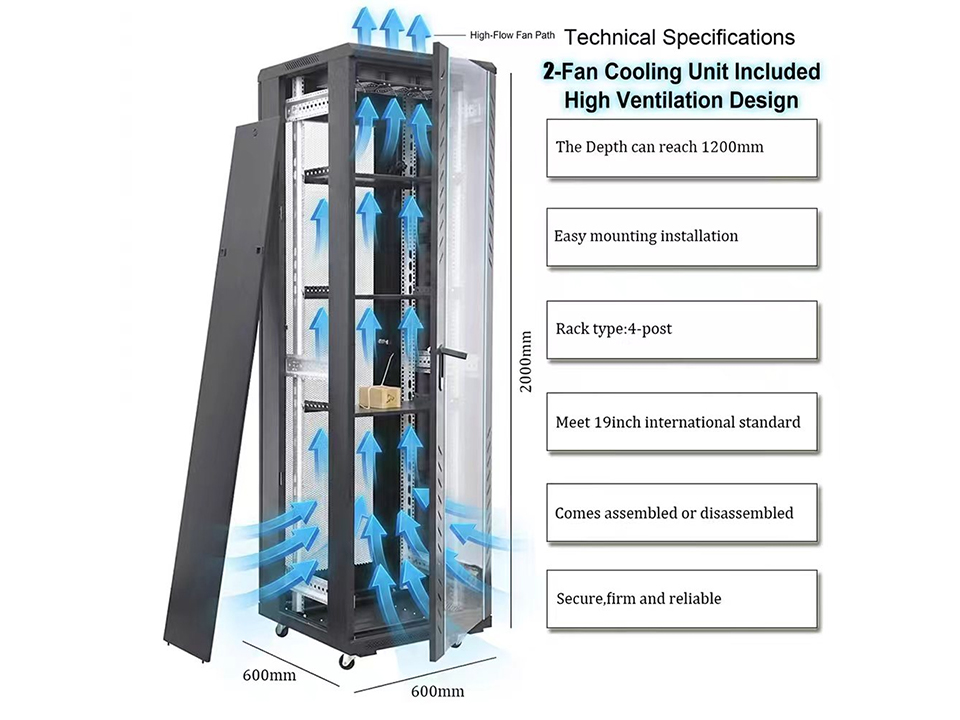
If rear cabling blocks exhaust, hot air recirculates. If the chassis is pushed too far back, front intake alignment suffers. If side-to-side airflow gear is mounted in a cabinet designed for front-to-back servers, the rack becomes a thermal compromise wearing a badge that says “standard.”
The buyer’s move is simple: map airflow before ordering. Front-to-back servers want open front intake and rear exhaust clearance. Network switches may need side ducts or offset mounting. Industrial devices may need separation from power components, pneumatic assemblies, or high-noise cabling. If the cabinet supports automation, even small control cables matter; 3-pin RC servo extension cable sets for automation parts should be routed so they do not become undocumented strain points inside shallow enclosures.
Do you need a 1200 mm rack for every system? No. But you need enough depth to keep airflow from turning into folklore.
My practical cabinet fit formula
Use this working formula before you approve the rack:
That example does not mean every 740 mm server needs a 1000 mm cabinet. It means an 800 mm cabinet would be a gamble unless the rail position, rear cable path, and PDU layout are unusually clean.
Gambles belong in poker, not infrastructure purchasing.
What I would put in a purchase request
A good purchase request should not say: “Need 42U rack, 1000 mm deep.”
It should say something like this:
42U four-post server cabinet, 1000 mm or 1200 mm external depth depending on confirmed usable clearance; adjustable front and rear mounting rails; compatible with OEM sliding rails requiring X mm to Y mm post spacing; perforated front and rear doors; rear vertical PDU mounting; grounding kit; M6 cage nuts; anti-tip or floor anchoring; blanking panels; cable management sized for rear power and network bundles; verified door closure with installed C13/C19 cords.
That is less pretty. It is also how adults buy infrastructure.
FAQ
What is the best rack depth for servers?
The best rack depth for servers is usually 1000 mm for general-purpose deployments and 1200 mm for dense systems, deep chassis, rear PDUs, cable management arms, or GPU-heavy equipment. The correct choice depends on chassis depth, rail range, cable clearance, airflow direction, and whether rear doors can close after installation.
For ordinary server rooms, I dislike 800 mm cabinets unless the server model and rail kit have already been checked. They can work. They also punish sloppy cabling. If the rack will grow over three to five years, 1200 mm often buys more operational sanity than its extra floor footprint costs.
How do I check server rack rails compatibility?
Server rack rails compatibility means confirming that the rail kit physically matches the rack’s front-to-rear mounting depth, hole type, post thickness, mounting hardware, weight rating, and cable management requirements. The server, rails, and cabinet must be checked together because a standard rack width does not guarantee rail fit.
Look for the rail kit’s minimum and maximum post spacing. Then verify square-hole, round-hole, or threaded-hole support. After that, check whether the cable management arm clears the rear door. I know that sounds tedious. It is still faster than discovering a mismatch while two technicians are holding a 30 kg server in the aisle.
What rack depth do I need for network switches?
Network switches often need less rack depth than full servers, but the required depth depends on switch body length, airflow direction, rear or front cabling, power supply layout, and patch-cord bend radius. Shallow 600 mm or 800 mm cabinets may work for network gear when cable management is designed properly.
Do not assume switches are easy because they are shallow. Some data-center switches use rear-to-front or front-to-rear airflow variants, and a wrong cabinet layout can fight the cooling design. Patch density also matters. A full 48-port switch with thick shielded cable can consume more practical space than buyers expect.
Is a 600 mm rack deep enough for servers?
A 600 mm rack is usually not deep enough for standard rackmount servers because most server chassis, rails, rear power cords, and cable clearance requirements exceed the practical usable depth. It is better suited for patch panels, small switches, AV hardware, and lightweight communications equipment.
There are short-depth servers and edge systems that can fit 600 mm enclosures. But I would never approve that from a category label alone. Check the chassis depth from the mounting ears, the rail kit range, and the rear connector clearance before buying.
Why does cabinet depth matter if the rack is 19 inches wide?
Cabinet depth matters because 19 inches describes the standard mounting width, while depth controls chassis fit, rail engagement, rear cabling, airflow, door closure, PDU placement, and maintenance access. A device can match the 19-inch mounting standard and still fail inside a cabinet that is too shallow.
This is the classic buyer trap. Width gets standardized. Depth remains a design decision. When a rack fails, it is rarely because the server is too wide; it is because the rails, cable arms, power cords, and rear door were never modeled as a system.
Final take: buy the depth you can defend
The right rack is not the deepest rack. It is the rack whose depth, rails, airflow, cable path, and cabinet fit can be defended with measurements.
I would rather see a buyer choose a 1000 mm cabinet with verified rail compatibility than a 1200 mm cabinet chosen blindly. I would rather see an 800 mm edge rack with clean cable exits than a “standard server cabinet” packed until the rear door becomes optional. And I would rather offend a vendor with fit questions than explain to operations why a paid-for cabinet cannot hold the servers it was bought for.
Before you buy, ask for three numbers: server chassis depth, rail mounting range, and usable rear clearance. Then ask one question nobody likes: will the door close after the cables are installed?